



La serie Galaxy S26 mantiene tus videos estables, incluso si tus manos no lo están
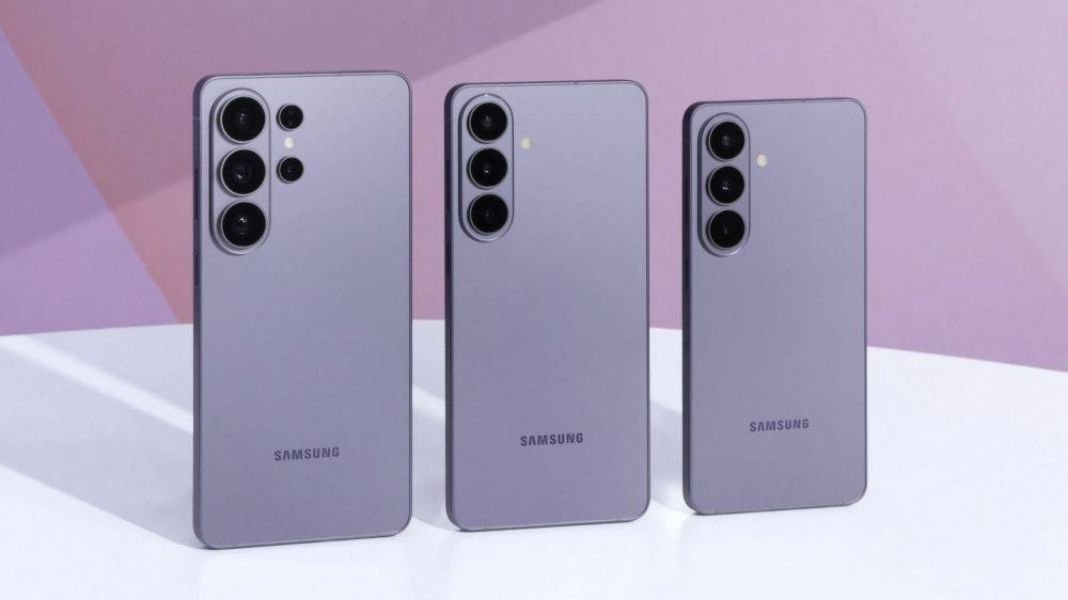
Usar el bloqueo horizontal al grabar videos Super Steady mantiene tus imágenes niveladas y fluidas.
La vida no se detiene cuando presionas grabar. Filmar en movimiento o intentar capturar un sujeto en movimiento puede resultar en cuadros temblorosos y movimientos molestos al reproducirlos.
El video Super Steady con bloqueo horizontal en la serie Galaxy S26 es como tener un gimbal cinematográfico o un estabilizador listo con solo tocar un botón, sin todo el equipo adicional.
Es una gran actualización para los creadores que capturan tomas complejas en movimiento, y también es increíblemente útil para los usuarios cotidianos que desean grabar videos fluidos sin los molestos saltos que son tan comunes en las tomas de acción.
Presentado por primera vez en los teléfonos móviles Galaxy en 2019, Super Steady ofrece una estabilización de video mejorada. Ahora, en la serie Galaxy S26, Super Steady con bloqueo horizontal hace que la experiencia sea aún mejor al ofrecer estabilidad cinematográfica con un encuadre constante para los videos, incluso cuando la cámara está completamente al revés.
¿Cómo funciona Super Steady con bloqueo horizontal?
La grabación mejorada de Super Steady con bloqueo horizontal mantiene las tomas niveladas utilizando el giroscopio y el acelerómetro del teléfono para calcular la dirección de la gravedad en tiempo real y corregir automáticamente el horizonte hasta 360 grados. Es ideal para capturar deportes de movimiento rápido como correr, andar en bicicleta o patinar sin inclinaciones ni sacudidas que distraigan.
Cómo usar Super Steady con bloqueo horizontal
- Abre la Cámara y cambia al modo Video
- Toca el ícono de video Super Steady
- Selecciona Super Steady con bloqueo horizontal
- Graba video.
El Super Steady mejorado con bloqueo horizontal es una de las muchas actualizaciones de las funciones de la cámara disponibles en la serie Galaxy S26. Los usuarios también pueden probar el video Nightography mejorado para obtener tomas más claras y vibrantes. Además, el Galaxy S26 Ultra es el primer dispositivo de Samsung compatible con APV, un nuevo códec de video de calidad profesional. El Galaxy S26 Ultra también ofrece el primer Privacy Display integrado de la industria móvil.
Quick withdrawals are what I care about most and this place delivers. No long waiting times or weird requirements. I trust iddtg288 for my gaming sessions.
I’ve tried a few platforms lately but this one really stands out. The loading speed is impressive and the interface is super friendly. Definitely my new go-to spot! phjilibey
Very stable connection and the registration was a breeze. I appreciate how they keep things simple and efficient. Big thumbs up for jili178login.
Porn apk’s comp 2 6 min Photo Video Editor is the easiest way to create the best photo music videos, slideshows and stories with your photos, videos and free music. In this application you will get many such features which you get to see in paid applications. com.xvideostudio.xvideostudiovideoeditor Millions of people download this Xvideo studio editor app and take the double enjoyment. Trillions of people share the reviews and call this app very nice compared to other apps; 10 million-plus downloaders are available. Users are satisfied with this app’s features. October 12, 2024 Social media sharing of videos is what has been behind the growth of video editor apps today. For this reason, the best video editors are ones with an easy sharing process, allowing for seamless uploading of edited videos to various social media platforms.
https://www.anonymz.com/?https://gransinologin.pl/
Land 3-5 scatters to trigger the bonus game with 10, 15, or 20 free spins. When two scatters land, a third can be randomly reeled in to also start the feature. ➡️ Casinos are licensed and tested by independent gambling auditors eCOGRA ✅ iTech Labs ✅ Gaming Laboratories International Keep an eye out for our deals and offers to see how you can make the most of Big Bass Bonanza and other slot or casino games to win real money prizes. Big Bass Bonanza is a Pragmatic Play slot that hit the casino floors in 2020. Big Bass Bonanza is focused on free spins and cash collection mechanics, providing players with an engaging way to land payouts. Key features include: Bigger Bass Bonanza offers a range of features designed to enhance gameplay and maximize winnings. The bonuses center around the free spins feature and the potential to collect money symbols. Find out how it works for you to sort out your strategy.
Turn long videos into snackable social media clips. AI picks the best moments so you can share them quickly and easily. Finding the right video editing app depends on your specific needs, from professional-grade tools to user-friendly features. While CapCut has its strengths, these alternatives offer different features and customizations to enhance your video editing experience. CapCut isn’t just a video editing app. Similar to TikTok, you can record video directly in-app, at 15-second, 60-second, and 3-minute intervals. Importantly, Edits does not apply a watermark or force you to pay to remove it. Nor does it only allow you to share your video to Instagram profile. This means it’s a versatile tool that you can use for videos for a range of social media sites. Importantly, Edits does not apply a watermark or force you to pay to remove it. Nor does it only allow you to share your video to Instagram profile. This means it’s a versatile tool that you can use for videos for a range of social media sites.
https://www.abclinuxu.cz/lide/theomedusde1971
60+ Supported Video FormatsSupports all popular video formats Finding the best Android video editor can be overwhelming, with so many options available. However, whether you’re looking for a free option or an AI-powered tool, there’s something for everyone. These editors make it easy to edit videos on Android and offer a range of features to suit all your editing needs. As always, if you have questions or comments, drop them here or hit me up on the Twitter @smartfilming. If you like this article, also consider subscribing to my free Telegram channel (t.me smartfilming) to get notified about new blog posts and receive the monthly Ten Telegram Takeaways newsletter about important things that happened in the world of mobile video. VN Video Editor is very careful about the personal details, cookies and the device storage access. So your information is safe with the app. On the other hand, the app can be downloaded to your device without any unwanted programs or malware being attached to it. To ensure this, always use the official website of the editor to get the APK files. So VN Video Editor is safe for both the user and device.
“Videoshop is a must for me. It provides a very clean user interface that’s direct and to the point. The app gives a ton of control over your video, including full volume control to avoid jump-scaring your audiences on socials.” – Angel Vivaldi, @angelvivaldiofficial, Musician Instagram head Adam Mosseri noted the app will remain free, though paid features could arrive in the future to support more compute-heavy AI functions. ” will be free. I think over time, we might have some paid features where we’re going to need to cover costs of things,” he explained on a recent Instagram post. Quik is a video editing app developed by GoPro, made for video editing on-the-go. You can edit content from your camera roll or imported GoPro footage and turn it into Instagram-ready Stories. Quik collects data from your footage–scanning for things like smiles, faces, voice, and being a GoPro app, cheering, jumps, and speed.
https://www.pr6-articles.com/Articles-of-2024/httpsspinfeverpromocodede
InShot for PC Latest Version For Download Inshot For PC click on the Downlod button Inshot For PC InShot Video Editor is a mobile app developed for Mobile Phones. While we can use an inshot editing app on a small screen, we also want to use this app on our computer so that editing is… InShot Pro is rich advanced video editing software widely used by content creators. It has a wide variety of editing tools: transition effects, text and music integration, emojis, and filters with background blurring change. Its main advantage is the fact that all features are available for free, which means you can edit long-duration videos without restrictions. InShot Pro APK has advanced video transition effects and unlimited layers for editing, which means you can create a real professional video. Other notable features include controlling video speed and exporting videos at multiple resolutions, including 4K quality.
Instantly swap faces in both videos and images with our advanced AI technology. Our cutting-edge app lets you effortlessly change any face, whether in a video or a photo. Perfect for content creators or casual users, our editor offers seamless transformations. Create captivating, personalized content with the power of AI-driven face swapping. Step 1. Open the AILab Center on any web browser. You can choose to drag and drop your video files or click the “Add video” button to upload a local file. Easily enhance the mood of your slideshow by incorporating music. Upload your own songs or choose from the royalty-free music track options on Vimeo to get started. AI GIF Generator allows you to transform your ideas into animated GIFs with the power of AI. Instantly turn text into Live Images and eye-catching GIFs with our AI GIF Generator.
https://md.magicware.cz/s/6xlct6jqs1
I’m on the hunt for some best video editing software for Mac (macOS Sonoma, M2) and could really use your advice. I want to up my editing skills but need a program that’s not too tough to get the hang of. I’m looking for something that’s pretty easy to use but still has all the cool features for things like cutting clips, adding effects, and maybe some fancy color grading. If you’ve got any favorites or tips on what works best, I’d love to hear about it. Thanks a bunch for any suggestions you can throw my way! If you want to learn how to edit faster in any video editing application, check out our Primal Video Method. It’s a free PDF guide that takes you through the most efficient way to edit your videos down with minimal wasted time and rework. OpenShot is a 100% free video editor with no hidden costs, watermarks, or subscription fees. The simple drag-and-drop interface and straightforward tools make it great for first-time editors. The software is equipped with multiple features and supports unlimited tracks, making it easy to produce high-quality videos and ideal for school projects, YouTube videos, tutorials, and home videos.